Open source web analytics. Hosted by you.
Privacy-first analytics you run on your own server. No cookies, no personal data stored, no third party in the loop. Apache 2.0.

What makes Recorde different.
Self-hosted, privacy-first, and built to stay out of the way.
Your data stays on your server.
Yours
where your data lives
Most analytics pipe your visitor data through someone else's cloud. Recorde runs on infrastructure you control. There is no third party, no sub-processor, and nothing to phone home to.
No cookies, no personal data.
0
cookies set
Visitors are counted with a rolling session ID kept in sessionStorage. IP addresses are used to derive a country in memory and discarded before anything is written. Global Privacy Control is honoured.
Open source, end to end.
Apache 2.0
licence
The tracking script, the Go ingestion service, and the Next.js dashboard are all in one public repository. Read the code, audit what it collects, fork it if you like.
One script tag. One clean dashboard. Your server.
Recorde replaces your analytics and your cookie banner with a single lightweight tag pointed at an instance you run.
Everything you expect. Nothing else.
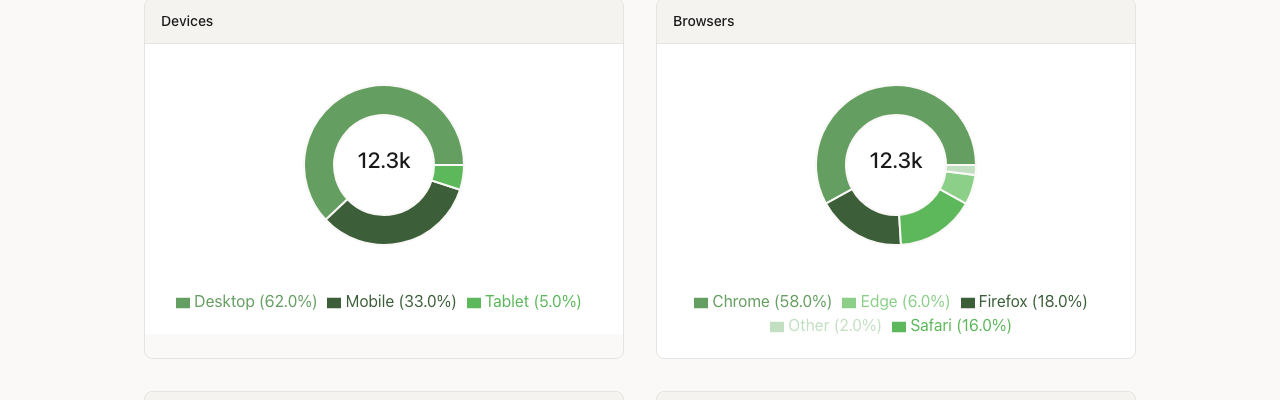
Pageviews, visitors, bounce rate, a realtime counter, top pages, referrers, countries, devices, browsers, UTM campaigns, entry pages, user journeys, and custom events. CSV and JSON export.
No cookies, no banner.
No popup, no accept-or-reject choice. Visitors see your site immediately. Query strings are stripped and sensitive parameters are removed before anything is sent.
~1 KB. Lighter than a favicon.
The tracking script is about 1 KB gzipped and loads with defer. Better Core Web Vitals, no measurable impact on load time, and you can pin it with an integrity hash.
Three steps. No surprises.
Deploy the stack.
Clone the repository, set two secrets in .env, and run docker compose up. A 2 vCPU / 2 GB VPS is plenty for most personal and small business sites.
Add one script tag.
Add your site in the dashboard and paste the snippet from its Setup page into your <head>. Single-page apps are tracked automatically.
See real-time traffic.
Within minutes, see pageviews, sources, devices and countries. Nothing else to manage, no data model to learn, no report builder to wrestle with.
$ git clone https://github.com/ronanpdh/recorde-analytics.git
$ cd recorde-analytics
$ cp .env.example .env
$ docker compose up --build<script
defer
data-domain="example.com"
src="https://collect.example.com/js/recorde.min.js"
></script>For HTTPS and email on a real server, follow the deployment guide.
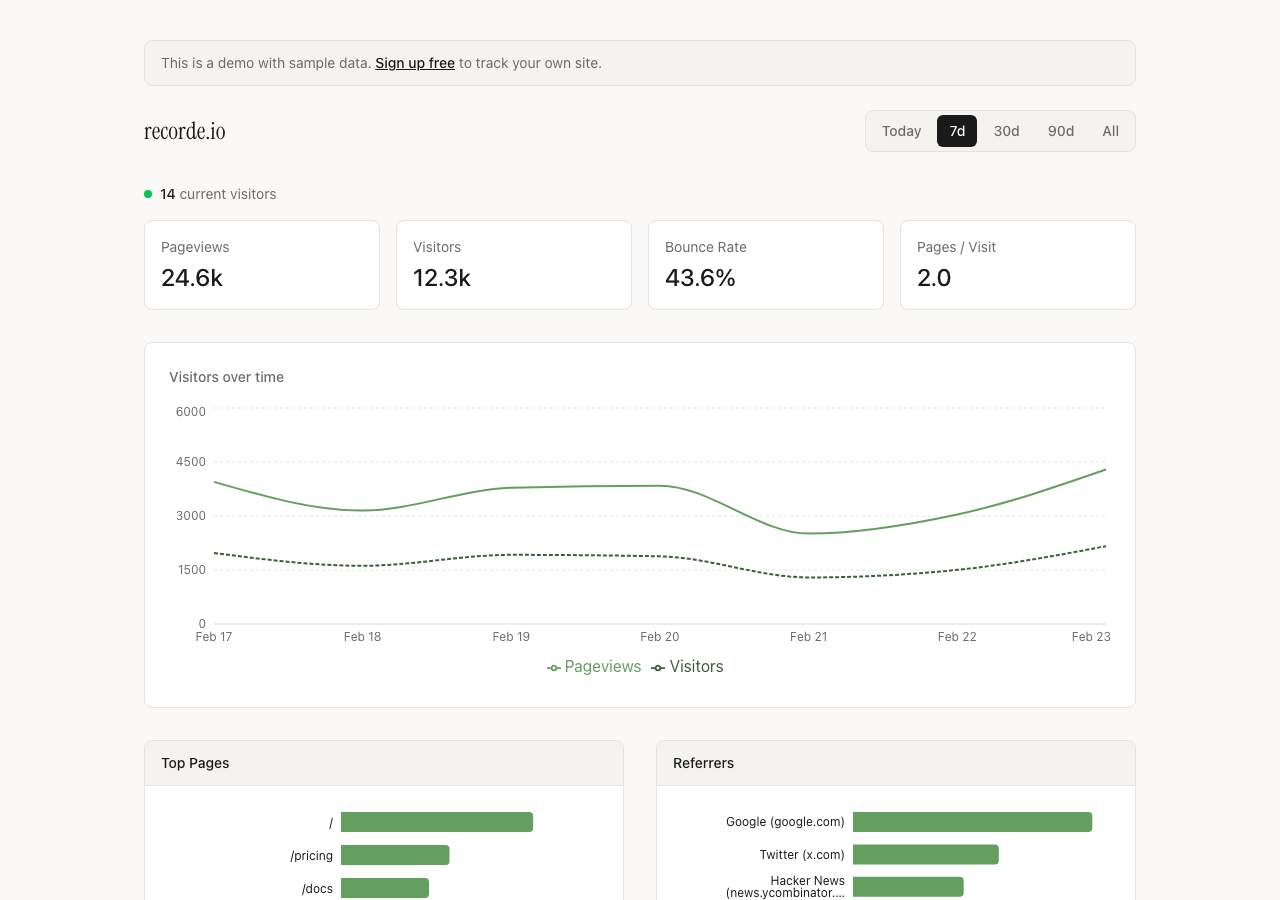
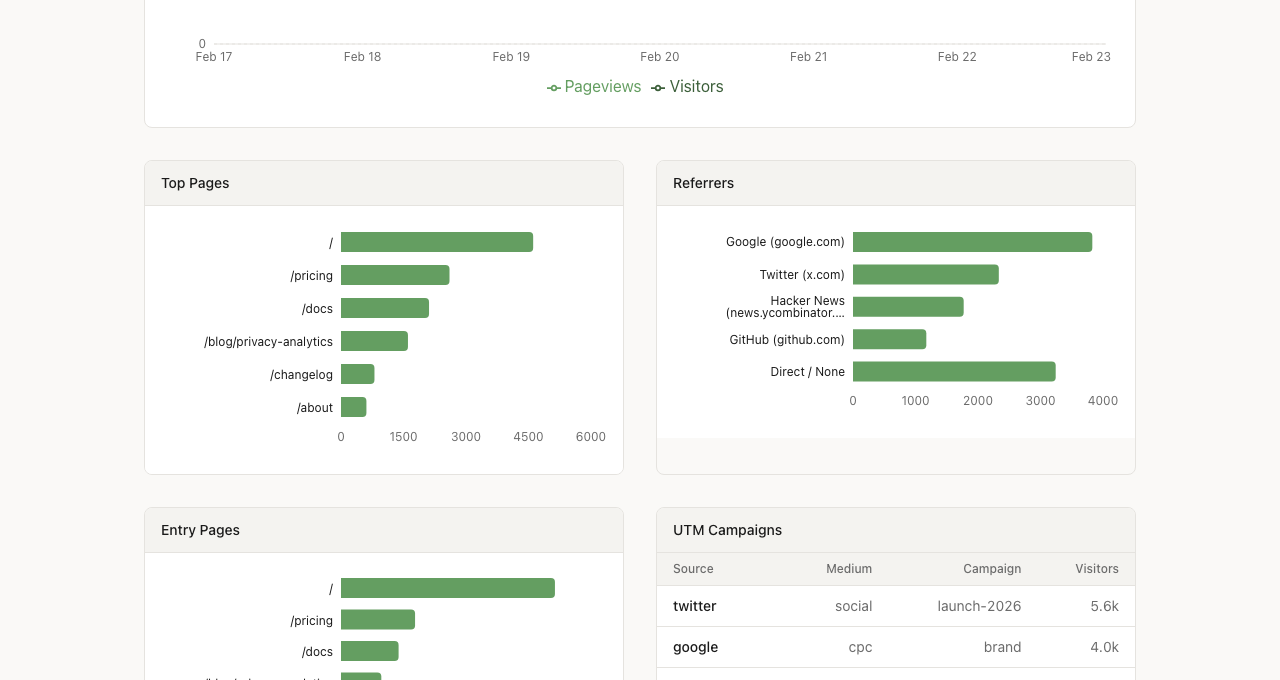
Your Recorde dashboard, running on your own domain.
Where your data lives, and what happens to it.
Four things you can check in the source, not just take our word for.
Your data stays on your server
Events go from your visitors' browsers to an ingestion service you run, into a database you own. There is no Recorde cloud in the middle and nothing is sent back to us.
Zero personal data
No cookies. No fingerprinting. No IP addresses stored. Country is derived in memory and the address is discarded before anything is written. Query strings are stripped from URLs.
Visitors stay in control
Global Privacy Control is honoured automatically. Every site gets a one-click opt-out via a link, a JavaScript call, or an optional privacy badge. Bots and crawlers are filtered out.
Open to audit
Every claim on this page maps to a file in the repository. The security documentation lists each measure with the source it lives in.
How Recorde compares.
| Recorde | Google Analytics 4 | Plausible | Fathom | |
|---|---|---|---|---|
| Open source | Apache 2.0 | AGPL-3.0 | ||
| Self-hostable | ||||
| Data stored on your server | Self-hosted only | |||
| Cookies | None | Yes | None | None |
| Script size | ~1KB | 90-134KB | ~1KB | ~2KB |
| Custom events | ||||
| Real-time dashboard |
Competitor details reflect publicly available information as of September 2026. Please verify at source before deciding.
Run Recorde on your own server.
Clone the repository, bring up the stack, paste the snippet. Keep it if it fits.
- One Docker Compose stack: dashboard, ingestion service, database.
- Minutes to first pageview. One script tag on your site.
- Run alongside your existing analytics. No disruption.
- Apache 2.0. No plans, no seats, no usage caps.
Frequently Asked Questions
Yes. Recorde is open source under the Apache License 2.0. There are no plans, seats, or pageview caps. You pay only for the server you run it on.
On your own server, in a TimescaleDB (PostgreSQL) database that the Docker Compose stack runs for you. Nothing is sent to Recorde or any third party. Wherever you deploy is where your data lives.
A Linux server with Docker and the Compose plugin, two DNS records (one for the dashboard, one for the ingestion endpoint), and optionally an SMTP server or Resend API key for sign-in emails. The deployment guide walks through a single-server install behind Caddy for automatic HTTPS. A 2 vCPU / 2 GB VPS is plenty for most personal and small business sites.
No. Visitors are counted with a rolling session ID kept in sessionStorage, which expires after 30 minutes of inactivity and is cleared when the tab closes. No cookies are set, and there is no fingerprinting or cross-site tracking.
No. The IP address is used in memory to derive a country (via a GeoLite2 database you supply) and is discarded before anything is written to the database. Without the GeoLite2 file, country simply shows as Unknown.
Yes. Global Privacy Control is honoured automatically. Beyond that, any page with #recorde-optout in the URL disables tracking for that visitor, there is a recorde.optOut() JavaScript call, and an optional data-privacy attribute shows a small badge visitors can toggle themselves.
Pageviews, visitors, bounce rate, a realtime counter, top pages, referrers, countries, devices, browsers, operating systems, UTM campaigns, entry pages, user journeys, and custom events with metadata. Data can be exported as CSV or JSON.
Yes. Call recorde.track("signup") from your site's JavaScript, optionally with a metadata object of up to 50 keys. Events are fire-and-forget and survive page navigations. The custom events guide in the repository has the full reference.
Yes. The script listens for History API navigations and hash changes and records a new pageview whenever the path changes. No extra configuration is needed for React, Vue, Angular, SvelteKit, or Next.js.
Yes. One script tag to install, and you see real-time data within minutes. You can run Recorde alongside your existing analytics for as long as you like and compare the two.
Yes. You can invite read-only viewers per site. Registration can be closed with a single environment variable so only invited emails can join your instance.
Recorde is built in the open by an independent developer. Issues and pull requests are welcome on GitHub; the contributing guide covers the layout of the repository and how to run the checks CI runs.
Analytics you can read the source of.
Free to run, free to fork, free to audit. Star the repository, open an issue, or deploy it this afternoon.
Apache 2.0 licensed. Run it alongside your existing analytics.